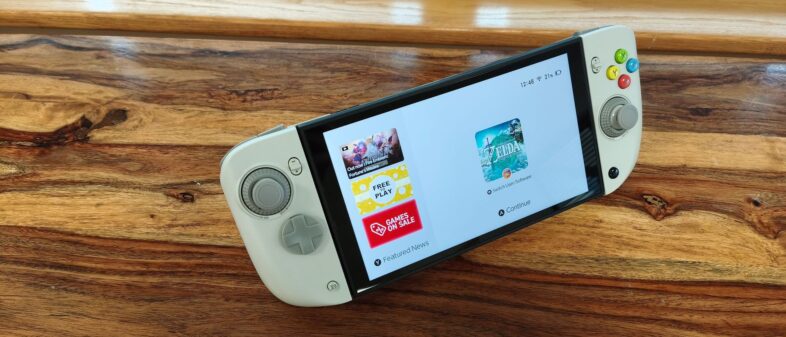
CRKD Nitro Deck 2: One-minute review
The CRKD Nitro Deck 2 is primarily billed as a Nintendo Switch 2 controller for handheld use, but it offers a lot more besides. It’s CRKD’s follow-up to the Nitro Deck and Nitro Deck+, two previous accessories aimed at the original Nintendo Switch.
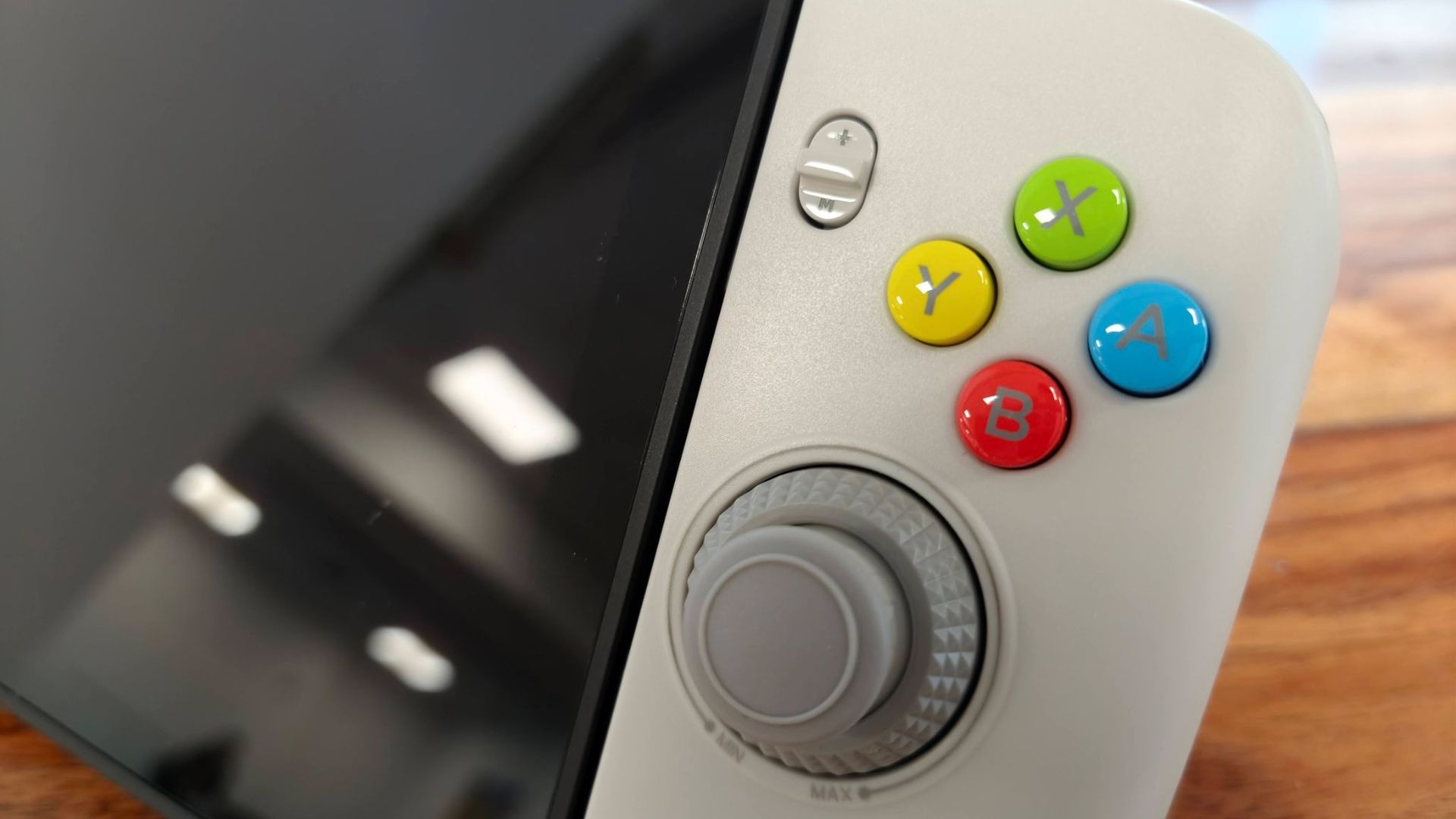
The CRKD Nitro Deck 2 has a functional design focused more on ergonomics than style, although some of the colorways add some panache; the Pal Grey variant I reviewed, for instance, harked back to retro Nintendo controllers, thanks to its colorful face buttons and darker grey accents.
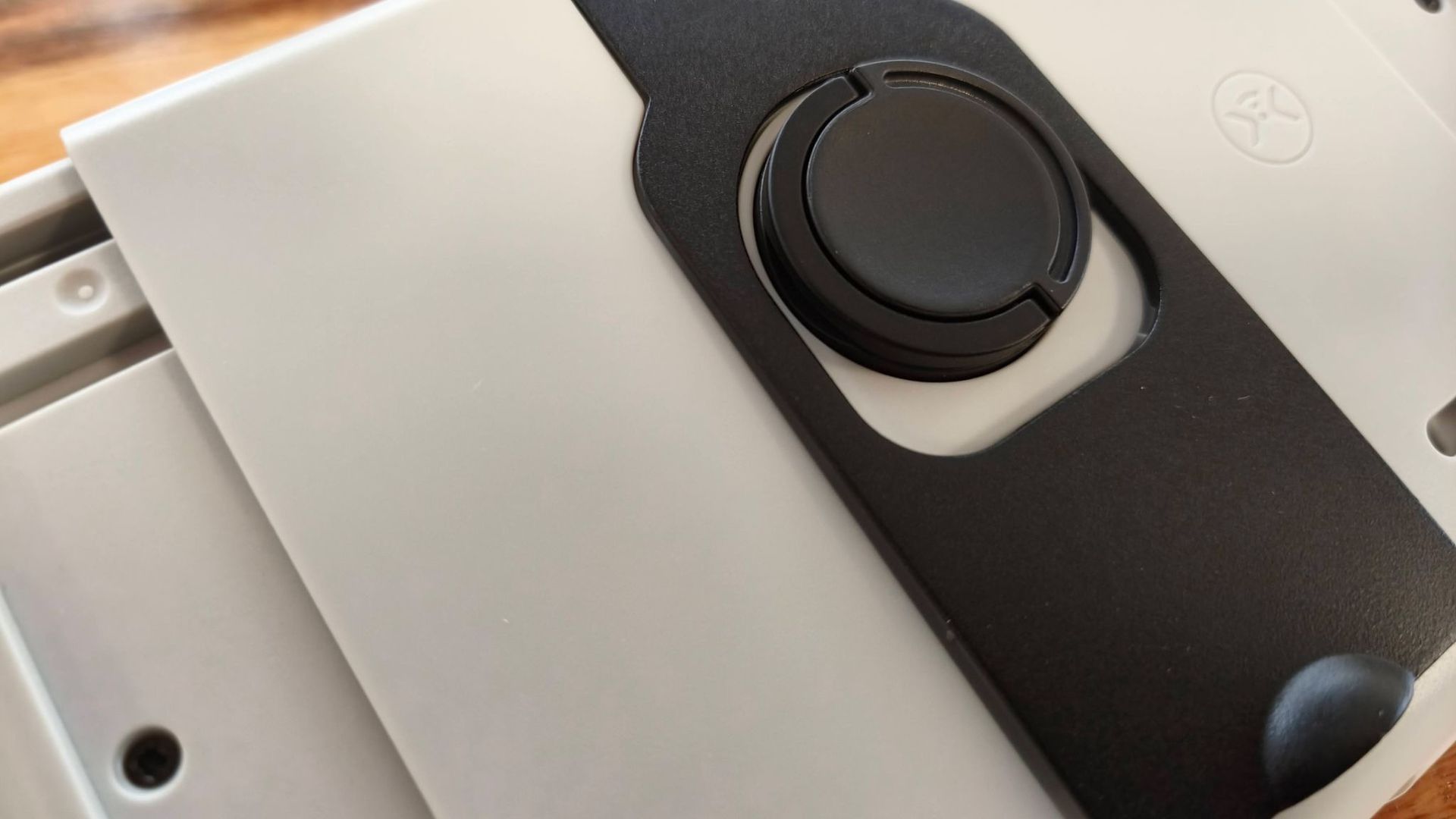
The Nitro Deck 2 fits to the Switch and Switch 2 by clamping on the sides of the unit, rather than actually connecting to the Joy-Con 2 slots. A small button on the back clicks and twists to tightly grip your console, and tight it is; even when I held it upside down, my console didn’t move an inch. You can then connect to your console wirelessly via Bluetooth or wired by using the included U-shaped USB adapter.
CRKD’s mobile app can be used to remap the inputs of the Nitro Deck 2, as well as enable the ‘No Deadzone’ mode for the joysticks. Its interface is clear and easy to use, and I didn’t experience any bugs. One downside, though, is that you have to reconnect to the app every time you open it by holding two buttons for three seconds, which limits the convenience of back-and-forth adjustments.
All the buttons feel great, providing plenty of clicky feedback and responsiveness. The back buttons are awkwardly placed, though, and I found myself accidentally triggering them on occasion.
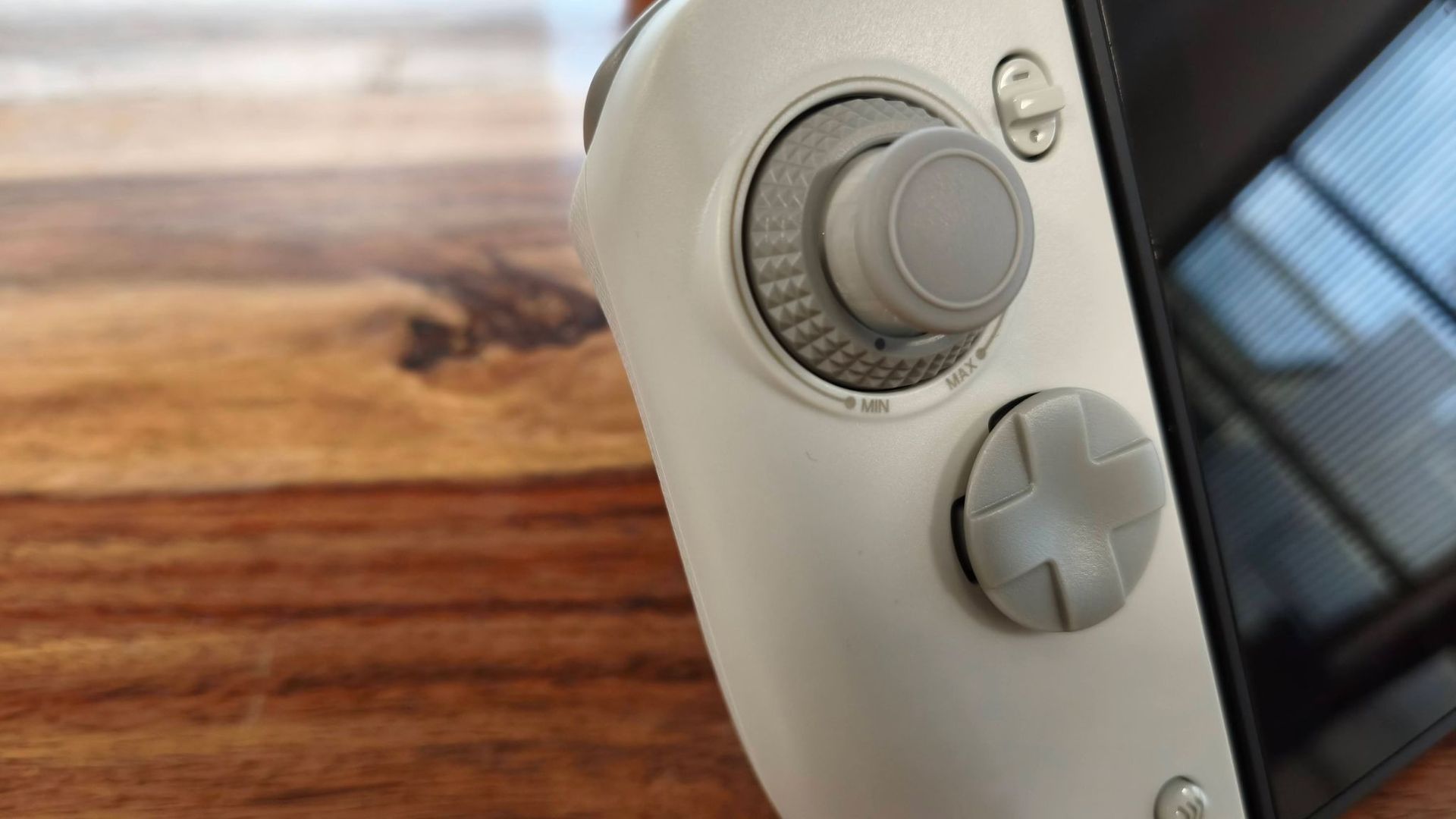
The real highlight of the Nitro Deck 2, though, is its joysticks. Not only are they precise and responsive, but they also feature dials that let you adjust their tension at any point, which is an excellent design choice and should allow any gamer to get their preferred feel.
Unfortunately, poor ergonomics detract from the Nitro Deck 2’s otherwise positive performance aspects. Not only do the pads angle inwards at the bottom, contrary to the majority of gamepads, but it’s also heavy when loaded with a console. These factors can make it cumbersome and awkward to use, especially when trying to game upright.
The Nitro Deck 2 is easy to pair to the Switch or Switch 2 via Bluetooth, although it takes a while to reconnect to your console after sleeping. Reconnection is quicker in wired mode, but it’s still not instantaneous. It was also easy to pair with PC and Android devices, although it’s a shame you can’t switch between them without having to pair each time.
The battery life of the Nitro Deck 2 is reasonable, lasting for as long as CRKD claims (15-20 hours), according to my testing. It’s a small inconvenience that you have to charge it separately from your console, though.
When you consider all that it offers, the Nitro Deck 2 represents good value. Not only are you getting handheld pads for the Switch 1 and Switch 2, but you’re also getting protection for your console, a standalone controller you can use with other platforms besides Nintendo’s, and a kickstand. Comfort issues do hamper the experience somewhat, but if you don’t mind holding a weighty unit, the Nitro Deck 2 is a fine choice as a versatile gamepad.
CRKD Nitro Deck 2 review: Price & availability
- $89.99 / £89.99 / AU$161
- Available now in multiple colorways
- Good price for a versatile handheld gamepad
The Nitro Deck 2 costs $89.99 / £89.99 / AU$161 and is available now in four colorways: Smoke Black, Pal Grey, LRG Fusion, and White. It comes with a USB cable, a double-ended USB adapter, and a legacy adapter for Switch 1 compatibility. The joystick caps and D-pad hat are replaceable, but no extra sets for either are included in the box.
This is a reasonable price for a unit that’s not only a Switch and Switch 2 handheld case and handheld controller, but also a standalone gamepad for PC and mobile, both wired and wireless.
You won’t find many more complete solutions for your Switch 2 than this, or even third-party substitutes for the Joy-Con 2 controllers, save for a few examples, such as the Mobapad M12 HD and M12S. A more left-field alternative to the Nitro Deck 2 is the GameSir G8+, a Bluetooth mobile controller that doesn’t officially support the Switch 2, but users have reported compatibility with the system.
If you just want a more comfortable handheld experience for your Switch 2 while sticking with the Joy-Con 2 pads, the Genki Attack Vector is a reasonably priced solution that offers three sets of grips as well as a backplate cover. What’s more, it can remain attached to your console when docked.
CRKD Nitro Deck 2 review: Specs
|
Price |
$89.99 / £89.99 / AU$161 |
|
Weight |
12.8oz / 363g |
|
Dimensions |
10.5-12.5 x 4.7 x 2.2in / 266.7-317.5 x 118.3 x 55.3mm |
|
Compatibility |
Switch, Switch 2, PC, iOS, Android |
|
Connection type |
Wireless (Bluetooth), Wired (USB-C) |
|
Battery life |
15-20 hours |
CRKD Nitro Deck 2 review: Design & features
- Functional looks
- Solid build quality
- Basic but effective mobile app
The Nitro Deck 2 has an appearance that’s more about function than form, with its soft edges and curves being more about ergonomics than aesthetics. It’s a fetching piece of design nonetheless, and the Pal Grey finish of my review unit added a retro appeal, with its dark grey accents and colorful face buttons alluding to the classic SNES controller.
The build quality is respectable, too. Although the plastic shell didn’t initially strike me as being particularly premium, I quickly felt its solidity and sturdiness once I held it in my hands. The sliding mechanisms for both pads operate smoothly as well.
Rather than the pads of the Nitro Deck 2 actually attaching to each Joy-Con slot on the Switch or Switch 2, they simply clamp to the sides of the console without actually inserting into these slots. To tighten the clamp, you simply push and twist the button on the rear of the unit. This requires a fair amount of force, and so does releasing it to remove the console, but I wouldn’t say it was overly arduous, and it’s worth the effort for the secure fit it provides.
When attached, the Switch 2 fits snugly and securely; I had no worries about it coming loose, as there wasn’t a hint of looseness. The unit also aligns precisely with the dimensions and contours of the Switch 2, although my one small gripe is that accessing the game card flap can be fiddly, as there’s little room to reach down to lift it up. This isn’t an issue when the Nitro Deck 2 is attached to the Switch 1, though, since the flap on that console opens the other way.
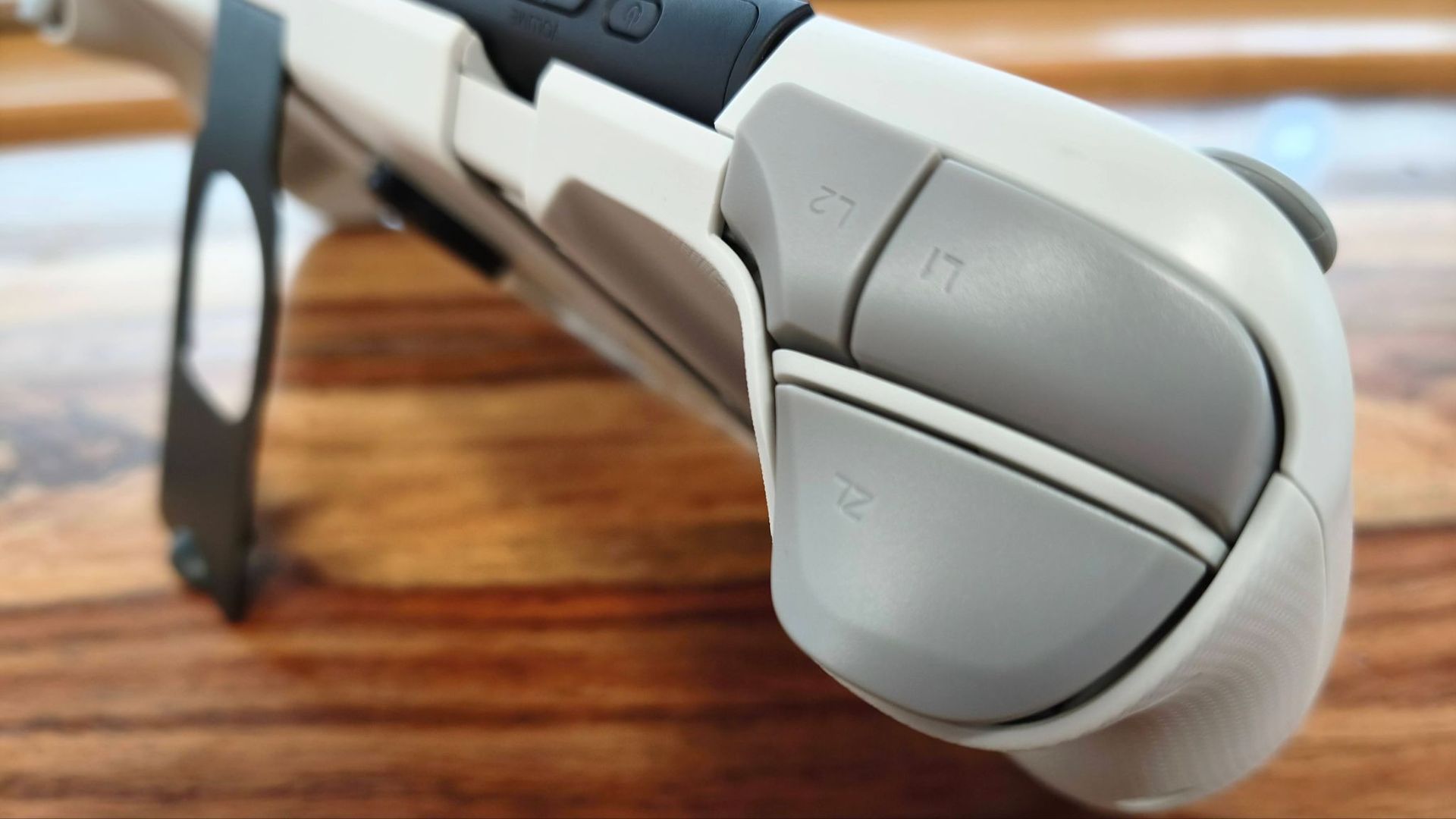
Speaking of which, the Nitro Deck 2 fits just as well to the Switch 1 as it does to the Switch 2. Thanks to the included legacy adapter, its USB-C port is still accessible, so you can still have a wired connection between the console and the Nitro Deck 2. This wired connection to both the Switch 1 and 2 is handled by another adapter, a double-ended U-shaped USB-C jack, that slots into the bottom of the Deck and the console.
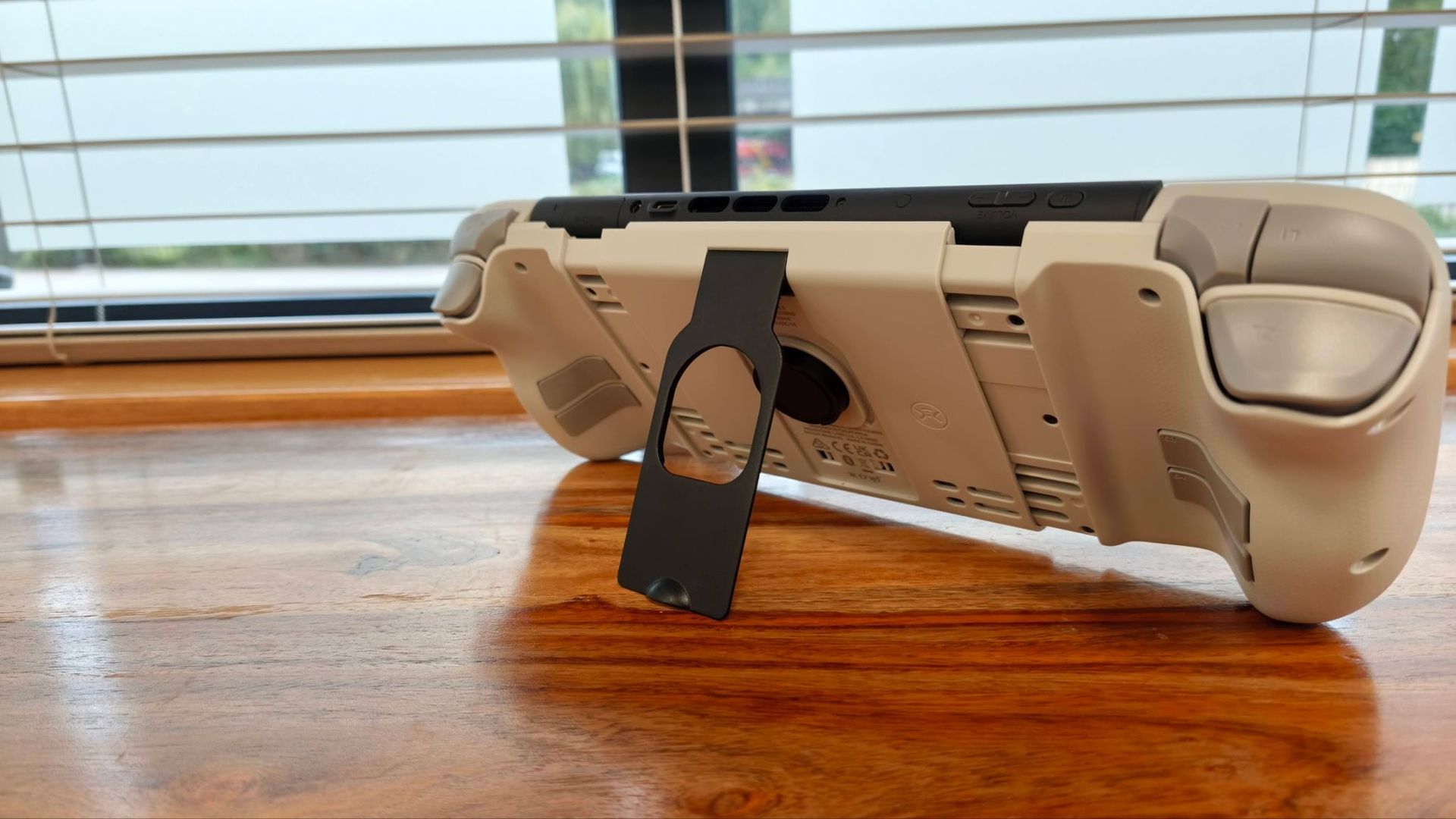
The Nitro Deck 2 also features a kickstand on the back, allowing you to use your console with another controller. This is made of metal and feels very solid. It’s also very sturdy when open, and it folds flush into the back of the Deck. It can be a little difficult to release it from its clip, but this is a small price to pay for its secure fastening.
To customize the inputs of the extra shoulder and back buttons, you can use the M button in combination with others to alter the mapping. However, you can also use CRKD’s mobile app, where you can remap every button, as well as enable a ‘No Deadzone’ mode for the joysticks in order to increase their sensitivity.
The app is clearly laid out and easy to navigate, and I didn’t experience any bugs or glitches, which was somewhat of a surprise given the poor rating it has on app stores. For some bizarre reason, though, it only operates in landscape mode, but more frustrating is the fact that switching between the app and your console isn’t exactly a seamless experience; you have to hold the Home button and the left D-pad button for 3 seconds every time you go back to the app after exiting it.
CRKD Nitro Deck 2 review: Performance
- Excellent joysticks
- Awkward to use upright
- Some connectivity issues
While its grips may look ergonomic, I struggled to get entirely comfortable with the Nitro Deck 2. Partly, this is due to the sheer weight of the unit when loaded with a console, which makes holding it upright a chore, even for short periods.
But the other half of the problem stems from the grips’ orientation. They protrude outwards at the top rather than at the bottom, running counter to the best Nintendo Switch 2 controller shapes, and are at a less natural angle for your hands. I did acclimatize to their form somewhat, but I was never entirely at ease with it.
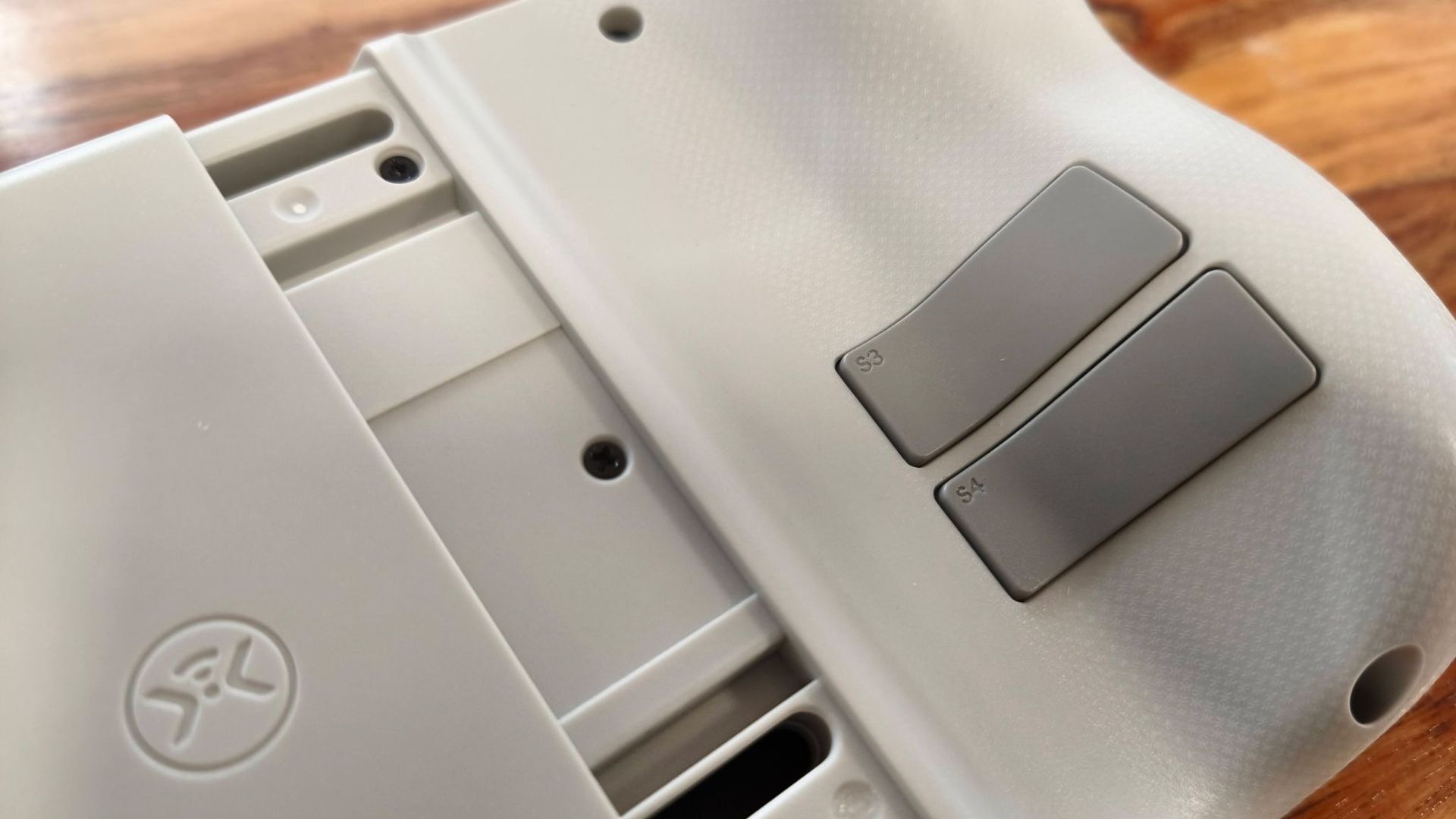
I also found the back buttons awkward to use, as they were too low down to align with my natural finger placement around the grips. Their low travel and resistance meant there were times when I accidentally triggered them, too.
These issues aside, though, the Nitro Deck 2 offers fantastic performance. The face buttons are clicky and satisfying to use, while the D-pad is very comfortable thanks to its circular hat. Its floating design also meant presses had plenty of travel, which in turn created good feedback. I found the shoulder buttons were easy to reach and use as well.
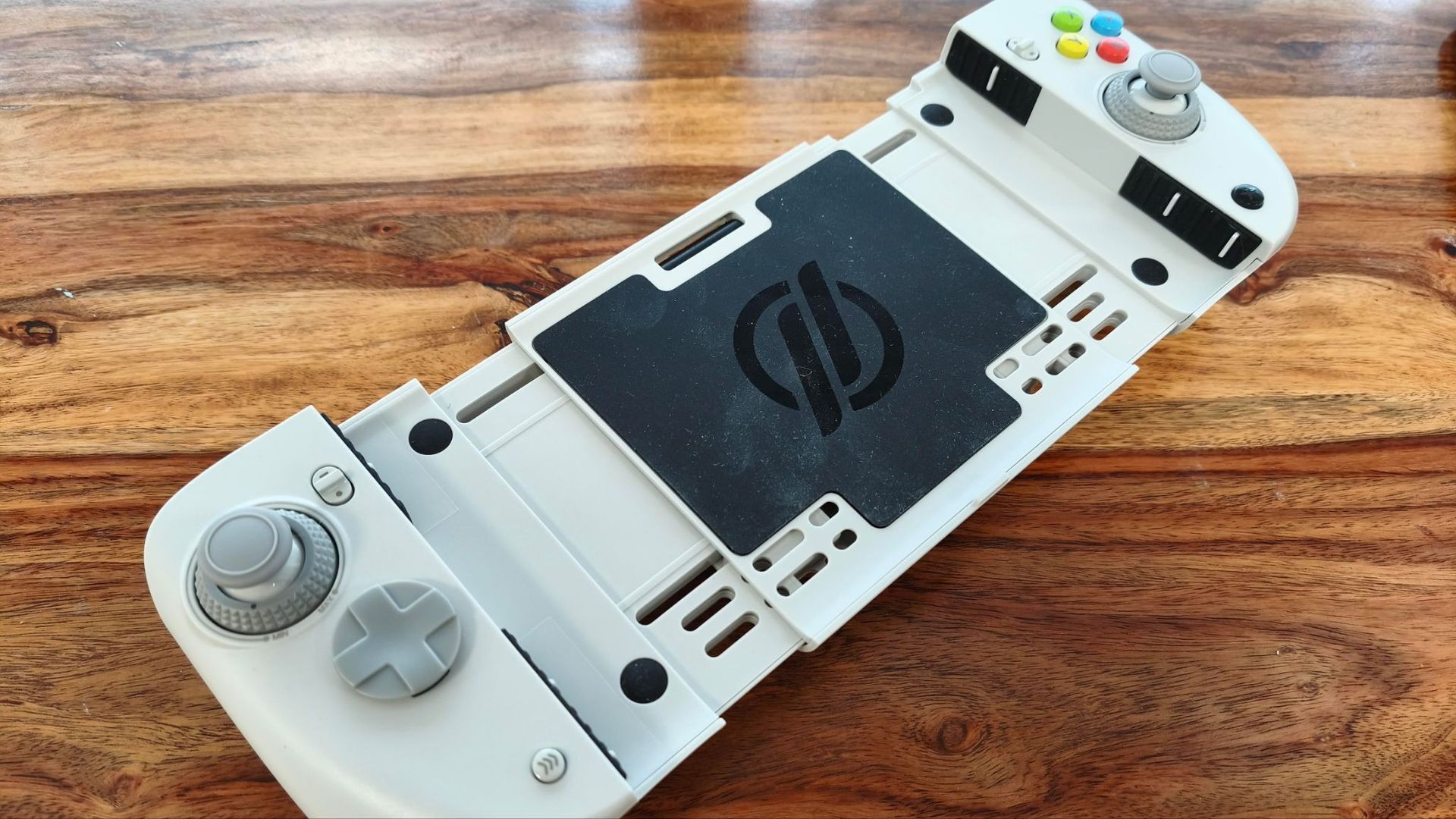
The best input of all, though, is the joysticks, which feature dials at their bases for adjusting resistance on the fly. This is a great idea and one I wish more controllers implemented. Looser settings allow for easy maneuvering and quick flicks, while tighter settings give you more control and precision.
The Nitro Deck 2 also features motion controls. I found these to be accurate and responsive when aiming with the bow in The Legend of Zelda: Tears of the Kingdom, although using them in handheld mode isn’t exactly practical, given the whole console moves with your hands.
Unfortunately, I did experience some small connectivity issues with the Nitro Deck 2. Although pairing with my consoles was a relatively quick process, it can be slow to reconnect when you wake your console. It activated quicker when I used a wired connection, but it wasn’t instant.
The Nitro Deck 2 worked just as well with my Switch 1 as it did with my Switch 2. It’s a shame, though, that the aforementioned legacy adapter doesn’t support console charging. I’m not sure whether this was a particular issue with my review unit or a known limitation, but either way it’s a shame from a convenience perspective.
As for other platforms, I had no issues connecting or using the Nitro Deck 2 with PC or my Android smartphone via Bluetooth, although hot-switching isn’t possible, with pairing required each time you move between devices.
The battery life of the Nitro Deck 2 is reasonable — according to my testing, it lasts about as long as CRKD claims it can, which is between 15 and 20 hours. However, it’s a shame you can’t charge your console and the Deck with a single cable, as there’s no passthrough feature.
Should I buy the CRKD Nitro Deck 2?
Scorecard
|
Category |
Comment |
Score |
|
Value |
The price is very good for a multi-platform handheld controller-cum-dock, and the quality is impressive, too. |
4.5/5 |
|
Design & features |
The Nitro Deck 2 has a functional form and great build quality, and the fit for the Switch and Switch 2 is secure. There are a few minor design niggles, though. |
4/5 |
|
Performance |
All inputs are tactile and responsive, while the adjustable joysticks are exemplary. The unit is a little heavy and awkward to hold upright for long periods, though. |
4/5 |
|
Total |
The Nitro Deck 2 is a very versatile and high-quality handheld controller for Nintendo and other platforms, but a few issues hold it back from being truly outstanding. |
4/5 |
Buy the CRKD Nitro Deck 2 if…
You’re fussy about stick feel
With the instantly adjustable tension for the joysticks, every gamer should be able to get the right feel.
You want a versatile controller
Not only does the Nitro Deck 2 work with the Switch and Switch 2 in handheld mode, but it can also be used to game on PC and mobile devices.
Don’t buy it if…
You want something light and very portable
With a console attached, the Nitro Deck 2 is noticeably heavy and bulky in the hand.
You want instant connectivity
The Nitro Deck 2 doesn’t wake up instantly with your console, and switching between devices requires repairing.
CRKD Nitro Deck 2 review: Also consider
|
CRKD Nitro Deck 2 |
GameSir G8+ Bluetooth |
Genki Attack Vector |
|
|
Price |
$89.99 / £89.99 / AU$161 |
$79.99 / £79.99 / AU$129.99 |
£39.99 (about $50 / AU$76) |
|
Weight |
12.8oz / 363g |
10.72oz / 314g |
N/A |
|
Dimensions |
10.5-12.5 x 4.7 x 2.2in / 266.7-317.5 x 118.3 x 55.3mm |
9.06 x 4.21 x 2.17in / 230 x 107 x 55mm |
N/A |
|
Compatibility |
Switch, Switch 2, PC, iOS, Android |
Android, iOS, Switch, PC, macOS |
Switch 2 |
|
Connection |
Wireless (Bluetooth), Wired (USB-C) |
Bluetooth 5.3, Wired (USB-C), Dongle (sold separately) |
N/A |
|
Software |
CRKD (mobile) |
GameSir App (Android only) |
N/A |
GameSir G8+
Although not explicitly marketed as a Switch 2 controller, user reports suggest that the G8+ does indeed work with the console. When we tested it on mobile devices, we were impressed with its comfortable grips and smooth, precise thumbsticks and triggers. Read our full GameSir G8+ review.
Genki Attack Vector
If you want to stick with the Joy-Con 2 pads but require better handheld ergonomics, Genki’s accessory may just fit the bill. It comes with three sets of grips to accommodate all kinds of hands, while the back cover adds some protection to your Switch 2 without compromising its fit in the dock (unlike the Nitro Deck 2). Read our full Genki Attack Vector review.
How I tested the CRKD Nitro Deck 2
- Tested for over a week
- Used on various platforms
- Relied on extensive gaming experience
I tested the Nitro Deck 2 for over a week, using it with both the Switch and Switch 2, as well as with a PC and my Android smartphone. I tested both wired and wireless connections. I also tested CRKD’s companion mobile app.
I played games such as Super Mario Bros. Wonder and Castlevania: Belmont’s Curse, both of which are good tests for the responsiveness of the buttons and comfort of the D-pad. I also played The Legend of Zelda: Tears of the Kingdom, which is a great test of all facets of a controller, including the motion controls.
I’ve been gaming for decades and have plenty of experience testing controllers and other peripherals for numerous platforms, including the Switch and Switch 2. I’ve also reviewed other Switch 2 accessories, including handheld grips.
- Read more about how we test
- First reviewed October 2026